As many users have discovered, Outlook's Options > Calendar Options > Add Holidays only adds the holidays to the default Microsoft Outlook calendar. Many users wonder how they'll get the Holidays on the other calendar.
It's easy - add the holidays to the default calendar then move or copy them to the other calendar.
Outlook 2010 and up
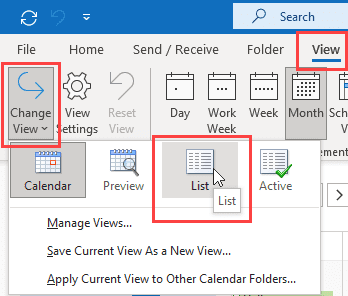
- Switch to the List view in Change View on the View tab.

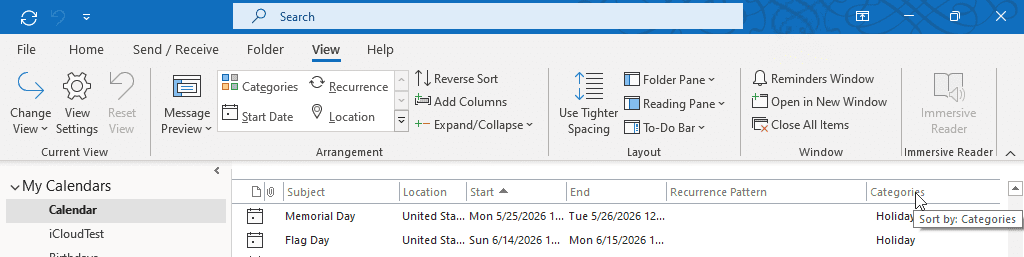
- Sort by the Category column.
- Collapse the groups from the View tab, selecting Expand/Collapse > Collapse All Groups. Or right-click on a group header and choose Collapse All Groups.
- Select the Holiday category.
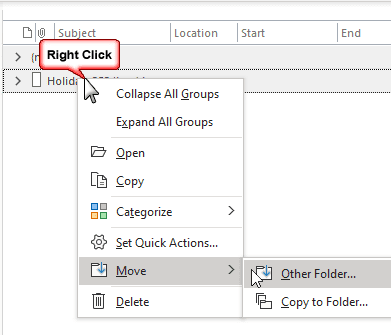
- Use the Move command on the right-click context menu to move or copy the events in the category to a different calendar. Or you can also drag the group to a different calendar.
- Go back to Change View and switch to the Calendar view.
Outlook 2007 and older
- Switch to the By Category view. The View selector is on the Advanced toolbar or look for it on the View menu.
- Select the Category
- Drag it to the second calendar folder. Left click drag will move the holidays, right click and drag will give you the choice of Move or Copy.
If you aren't good at dragging, you can select the Holidays and use the Edit, Move to Folder or Copy to Folder Command.

Help...I can't see how to change to "view by category". :(
You need to use the List view then sort by categories in current versions of Outlook.
(I updated the instructions. Thanks for bringing it to my attention.)
Thank YOU! :-)
Worked like a CHARM! Thanks SO MUCH for posting/sharing what you learned!!
Thanks so much!! Just swithed to icloud and windows 8 at the same time and was missing my holidays in the outlook calendar. This worked like a charm!
Thank you, Thank you, Thank you!! How easy!! Wish I would have seen your post before trying a bunch of other things! Worked great...