Outlook 2016 users with POP3 accounts that are downloading mail over and over or deleting it from the server when Outlook is set to leave it on the for a period of time, see Outlook 2016 POP Account Problems.
This problem affects Outlook 2010 users with multiple POP3 accounts delivered to one *pst file:
Outlook 2010 is downloading duplicate emails over and over again, but only for my additional accounts, not my default account. I have "Leave a copy of messages on the server" enabled and when I take this setting off, Outlook does not download duplicate emails and works correctly. However I need to leave mail on the server.
This is the result of delivering the secondary accounts to the default data file.
Background
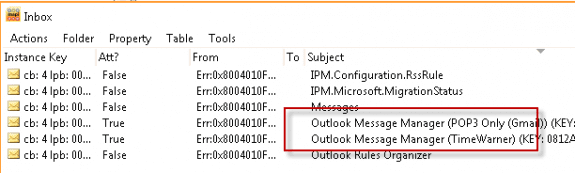
When you leave mail on the server, Outlook needs to keep track of the messages it already downloaded. It uses a hidden message called Mailbox Manager, which it stores in the Inbox. In older versions of Outlook, each POP3 account had it's own Mailbox manager file. In Outlook 2010, the Mailbox manager file is stored in the delivery location for each folder. In Outlook 2010, only one Mailbox manager file exists in a pst when more than one account is delivered. Because one Mailbox Manager is shared between multiple accounts, the last message downloaded for the account is easily lost.
The Mailbox manager file in Outlook 2010 will have a name similar to this:
Outlook Message Manager () (KEY: 47656E6572616C204B657900)
This screenshot is from Outlook 2007, where two accounts are delivered to the same pst file.

Hi Diane, I have a similar issue with Outlook 2007 (12.0.6753.5000) SP3 MSO (12.0.6762.5000). I just started a month ago. I've always had the setting "Leave a copy of messages on the server" set along with "Remove from server when deleted from 'Deleted Items'". It starts receiving emails that are a couple of months old and older even after i've deleted them and emptied the "Deleted Items" folder. I've deleted the same emails now 5 different times and it doesn't matter. Also, this does not happen when i access my email via the web interface or on my mobile device. I never get the permanently deleted emails, just on Outlook. I have only one account and one PST file. Any suggestions would be most helpful. :)
>> Also, this does not happen when i access my email via the web interface or on my mobile device.
so the messages you deleted in outlook are gone from the server but outlook keeps downloading them?
If you mean that when you delete them online or from the device, the delete actually works... this usually means Outlook isn't properly talking to the server or the connection is interrupted before they are finished.
How frequently are you checking for new mail in outlook? Set it to no less than 5 minutes.
I have a similar problem, as of today 19/01/2017 i have an old email from greetings123 telling me my account has been approved. I get the same email in my junk folder at least three times a day. Beleive me, that is frustrating. Unfortunately I am noot a computer geek so I find it hard to follow some of the advice here. Any ideas anyone, ??
same email, over and over & the same date so obviously it is coming from my computer or server.
1000 of older msgs have been sending and receiving iam using outlook 2003 plz kindly reply for the solution
Are these messages saved on the server? Outlook wouldn't be sending old messages unless they are in the outbox but it will download messages saved on the server if the 'mailbox manager' file that tracks the last downloaded message is damaged or you create a new profile.
My Outlook keeps downloading old emails. I thought I would let is run through the thousands of emails on the server and it would stop. But it then started all over again. My IP (Bell Canada) tried helping me by resetting some aspects of my account, but then they gave up and said I need to save my emails and folders and re-install Outlook. Is that going to solve my issue?
Sorry I missed this earlier. Reinstalling will not fix this problem. it was caused by a damaged mailbox manager file or you created a new profile or a new pst. if the connection to the server is interrupted, it will start over - not uncommon when there are a lot of messages.
You either need to let outlook download the mail (can use a rule for messages received within a certain date to filter the old mail), or delete it from the Inbox on the server - either by moving it to the deleted folder or to another folder.
See https://www.slipstick.com/general/outlook-downloads-duplicate-emails-from-pop3-account/ for more details.
Where exactly can I create another pst file on Outlook for Mac? I am running Outlook for Mac 2011
Outlook for mac doesn't use pst file. Do you need a new local storage file or a second local storage file?
This is happening to me and I can't get it to stop. I am the smallest of small businesses and I can't afford not to be able to produce. Without my email functioning it is all but impossible. I am using an old version of outlook but I'm not sure which one.
What exactly is happening?
How many accounts are in your profile?
Look in Help, About or the File tab, About to get your Outlook version. It would really be helpful.
Diane, is there a way to replace or reinstall the mailbox manager file? Every time I log on to Outlook, it downloads everything on my server, and I don't want to have to delete or move everything I have received before using Outlook, and my boss wants to leave our emails on the server, so I can't just change the option to remove them from the server...
No, it's a hidden file created by outlook. Is it repeatedly downloading everything? If it's just bring them down once, you can move the new duplicate items (using the last modified date) to a new pst then close the pst and delete it later. Once outlook has everything downloaded, it shouldn't download them again unless something is causing the file to corrupt.
My outlook starts all over again after downloading 17,000+ emails! I have tried all your suggestions and have not been able to stop it!
See https://www.slipstick.com/general/outlook-downloads-duplicate-emails-from-pop3-account/ for suggestions.
Hi Diane. I hope you can help me with this. I have this colleague who is having problem with her outlook account. It keeps downloading previous messages even dated 2 to 3 years ago (like 5000 messages), and it is causing her to much hassle. She asked me to fix it on my end. She is overseas so i dont know if there's a way I can access her unit. Maybe through event viewer. But how will i fix it? What is the process to prevent this from occurring? Your help will be much appreciated. Thank you in advance.
There are different ways to fix it, depending on the cause. When you use POP3 and leave mail on the server, Outlook keeps track of the messages downloaded in a file called Mailbox Manager. If that file is deleted or get corrupted (usually by AV software or scanpst), Outlook will download mail again since it doesn't know what the last message was. The solution is to not leave mail on the server or don't leave it in the Inbox, as POP3 only checks the inbox. Either of these will definitely fix it. If your mail server config lets you archive older mail to a different folder, that would be the best & easiest solution. Otherwise you need to move the mail into a subfolder vor delete it.