Thanks to Shawn for identifying this Instant Search bug in a thread at OutlookForums.
When you use the individual navigation modules in Outlook 2010 and use Instant Search, the More button displays the fields associated with the folder type. For example, if you are in the Contacts module, you'll see contact fields. In the Notes module, you only see notes fields; in Tasks module, you see task fields; That’s how it should be.
If you are using the Folder list and begin a search the More button only displays mail fields.
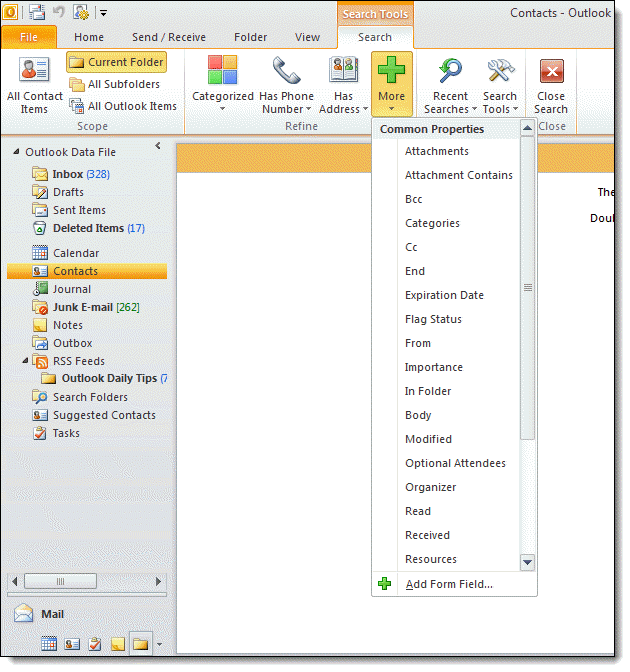
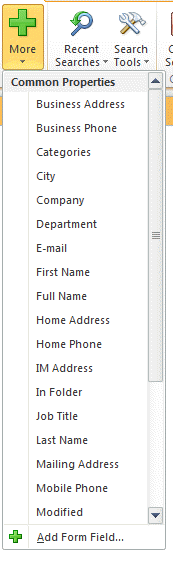
The solution, at least for now, is to use the navigation pane modules or type the field names in rather than picking from the More fields list. Type the field name (no spaces) in this format: fieldname:(keyword)
Once you learn the fields names, it’s often faster to type the query as switching between mouse and keyboard slows even the slowest typist down. Use Ctrl+E to initiate the search and your fingers will never leave the keyboard.
If you prefer using the More list to select fields, switch to the correct navigation module. The folder you are working in will remain selected. If you are one of the few Outlook users who has removed all of the module buttons from the navigation pane, leaving only the folder list, use Ctrl+n to jump to a module and Ctrl+6 to jump back to the folder list.
The keyboard shortcuts for the navigation pane are as follows:
Ctrl+1 : Mail
Ctrl+2 : Calendar
Ctrl+3 : Contacts
Ctrl+4 : Tasks
Ctrl+5 : Notes
Ctrl+6 : Folder list
Ctrl+7 : Shortcuts
Ctrl+8 : Journal
Ctrl+9 : BCM dashboard (if BCM is installed)
Do I expect this bug to be fixed? Only if the fix is simple. Because the workarounds are easy to use and so few use the Folder list view exclusively it's not going to have a high priority.
More Information
Instant Search Tips
Windows Search Advanced Query Syntax
Instant Search in Outlook 2010 (Outlookforums)
