We get a surprising number of questions that go something like this:
I want to use my stationery for all messages, both new messages and replies or forwards. Where do I need to configure this? Is it even possible?
Outlook only uses stationery for new messages, not replies and forwards, but a lot of users want to use their carefully crafted stationery in all messages they send. Although Outlook always uses the original message's formatting for replies and does not allow you to choose stationery for replies and forwards, it is possible to reply using your stationery.
To use your own stationery in replies, you can use a macro. See "Apply Outlook Stationery to Replies and Forwards" for more information.
Outlook offers five reply formats:
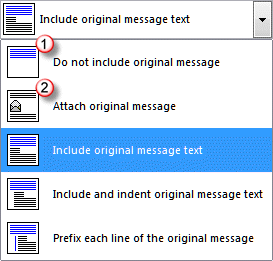
- Do not include original message
- Attach original message
- Include original message
- Indent and include original message
- Prefix each line of the original message
While original and prefix original are the most commonly used formats, the "Do not include original message" and "Attach original message" reply formats (1 and 2 in the screenshot) will use your stationery because Outlook begins with a blank message.
However, because most users prefer to have the last message quoted in the reply and many are annoyed by unnecessary attachments, I don't recommend using either reply format. Stick with include original message or prefix each line formats.
If you need to forward a message as an attachment you can do it "on the fly" by selecting more than one message and hitting Forward. If you only need to forward one message as an attachment, delete the second message. Note that this is not necessary in Outlook 2010 as you can use the Forward as attachment command on the right click Context menu or More command in the ribbon.
Changing the Reply or Forward Format
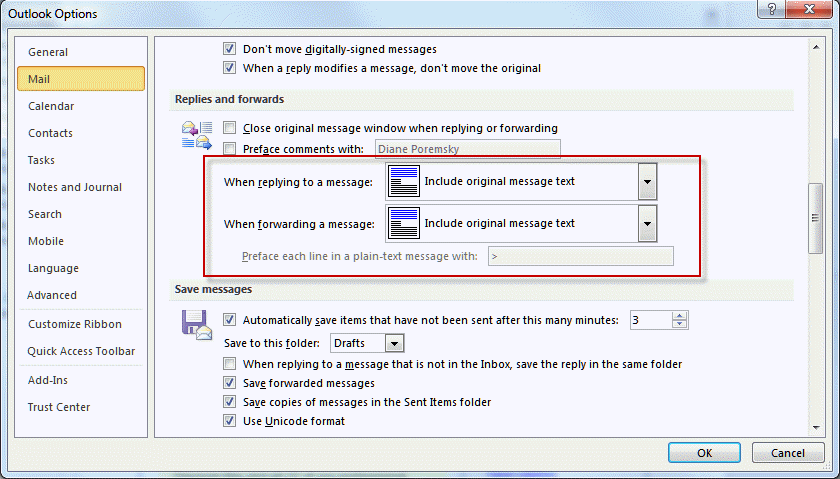
To change the reply format in Outlook 2010 or newer: Go to File, Options, Mail. The Replies and Forwards section is about halfway down. Choose the desired format. If you are using "Prefix each line", the prefix field will become active.
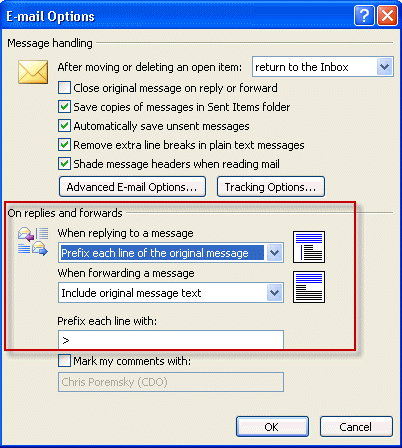
In older versions of Outlook, you'll look on the Tools, Options dialog. Open the Email options button (on the Preferences tab).

If I use stationery, the reply/forward messages not only don't use the stationery, they also ignore the reply font formatting set in my options. Any suggestions here?
Very good advice. Do you have any suggestions for setting paragraph spacing for replies/forwards? For new messages, you can set a default, but this doesn't carry over to replies and forwards. I'd like to have 6-12 points of space after each paragraph. Otherwise, like everyone else, I add a manual return between every single paragraph. Thanks in advance.
No, I don't have any suggestions, but see if any of the suggestions at https://www.slipstick.com/problems/messages-are-double-spaced/ work for you.