A user wanted to know how to move their auto-complete list to a new account in Outlook:
We're switching from Google Apps to Office 365. Can we migrate auto-complete addresses to the new accounts? We don't have an NK2 to import.
The auto-complete list for Outlook 2010 and newer is stored in .dat files in the RoamCache folder under the Local AppData folders. You can access this folder by typing or pasting the following command into the address bar of Windows Explorer and pressing enter.
%localappdata%\Microsoft\Outlook\RoamCache
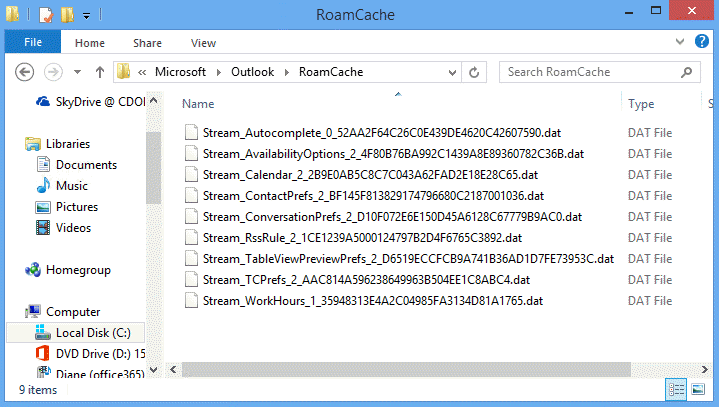
You can use a utility to extract the addresses from the auto-complete stream and insert them into the new auto-complete stream. Or you copy and rename the .dat file with the name of the .dat file used by the new account.
In Outlook 2007, the autocomplete list is stored in a file with the extension NK2. If you are moving from Outlook 2003 or 2007, you'll need to import the NK2. When you upgrade in place, the NK2 should be imported automatically. If you get a new computer, copy it to the same location on the new computer and start Outlook using the /importnk2 switch.
Auto-Complete Cache Editing Tools
Tools
| debunk2 | Open source project to read MS Outlook autocomplete (NK2) files and extract email addresses. Beta version 0.5 |
| NK2Edit | Use NK2Edit to edit or delete information stored in the NK2 file or Outlook 2010/2013's Autocomplete Stream, including the display name, the email address, the exchange string, the Drop-Down display name, and the search string. Free for home use; Commercial license available. |
| NK2View | Use NK2View to view, edit or delete entries in Outlook's .NK2 AutoComplete file. Export the records to text, html, or xml files. Freeware. Version 1.37 |

I tried this with Outlook 2021, and whether I try to open the new .dat file and replace the contents with the contents of the old .dat file OR if I just try to delete the new .dat file and rename the old .dat file the same name as the new .dat file, as soon as I open the Outlook 2021 client, the file reverts to a file size of 4K and empties out.
Any experience with or advice for this situation?
Thank you!
YOU SAVED MY LIFE, THANKS!
THANKS SO MUCH!!!!!!!!!!!!!!!!!
After figuring out for hours and not having success, I found this post and NK2EDIT worked as charm!!!
Thanks Diane!!!!
Diane, how do I copy the autocomplete list from one profile to another?
I have created a new profile and added my accounts. Everything is available but for autocomplete list.
You'll use the same method. You'll need to identify the cache file used by the old profile (should be larger), copy the file and then rename using the name of the file outlook created for the new profile. Or... use the nk2edit utility from nirsoft to export the names from the old list and import to the new.
Unfortunately, if you deleted the profile and outlook deleted the cache file, its gone. :(
how do you do for apple, girl?
Moving the autocomplete list from Apple? I don't think you can - the list is at /Users/YOU/Documents/Microsoft User Data/Office 2011 Identities/Main Identity/Data Records/Recent Addresses/0T/0B/0M/0K/x19_nnn.olk14Recent for Outlook 2011, not sure where it is for 2016.
Diane, After dealing with this in Outlook 2016 for a few months, I've come to the conclusion the file isn't getting corrupted but it has another copy inside the PST file. I can't find any Microsoft information on this but I didn't look too hard, what I really want is an explanation of what happens with this file. I've had very inconsistent results, but let me detail some of the issues: So if I'm doing the rename trick I always make a copy of the source, because as you noted it sometimes gets "corrupted" or plain reverted back to the almost empty list. With outlook open, adding an entry (my email) initially starts the autocomplete list, however it doesn't make the roamcache file until I close outlook. If I then replace it with a "completed" copy it may initially work but when I close outlook again it writes back the nearly empty copy. With nk2edit I get similar results, modify the file with outlook closed, open outlook it seems to work, close outlook and the changes I've made revert back to the old copy. Then on most occasions it works first try, but when it doesn't work it's very aggravating.… Read more »
Hi Phil,
I have a similar issue but with a twist. My outlook 2013 died a sudden and inexplicable death and MS were not able to help without advanced support ($$$) so I just upgraded to 2016. All went fine but my auto complete files did not come over. I have found the old cache files and I tried to copy the current one with the old one by switching names. But no luck. Any advice you can give on this?
That *should* work (you'll also need to do it while outlook is closed) - if not, nk2edit can add the names to the new list. (i just added the utilities list to this page)
I would try opening those files in nk2edit, it now supports the stream files so first make sure the files you are working with have the data you desire, once you confirm that make 2 or 3 copies so you don't have outlook overwriting your good files. I usually do the rename trick but nk2edit has merge features that you can use to try to force the entries into your current stream files. Good Luck
Nk2 edit worked for me. Once I located and opened the file, I just selected all contacts (ctrl-A) and then chose File > export to outlook. So they are now in my contacts. No issues merging files. My approach moved them from old temp list to new contacts. Hope this helps.
Thanks Diane for this helpful page!
How do you export the addresses to a CSV file?
You'll need to use a utility to export the autocomplete cache to a CSV file.
https://www.slipstick.com/outlook/email/understanding-outlooks-autocomplete-cache-nk2/#tools - KN2Edit is the one use.
In MS Outlook go to FILE > OPEN & Export > Import / Export > Export To a File > comma separated values.
The below mentioned only applies to suggested contacts.
Which is really a contacts folder, not autocomplete cache. :)