If you want a specific address list to be shown first when you open the address book or click the To button, you can select it in the Address Book options. You can also set the order Outlook searches your address books in this dialog.
In Outlook 2010 and newer, Outlook chooses the sending account based on the folders you are viewing and defaults to that data file's Contact folder. You can select any address source available.
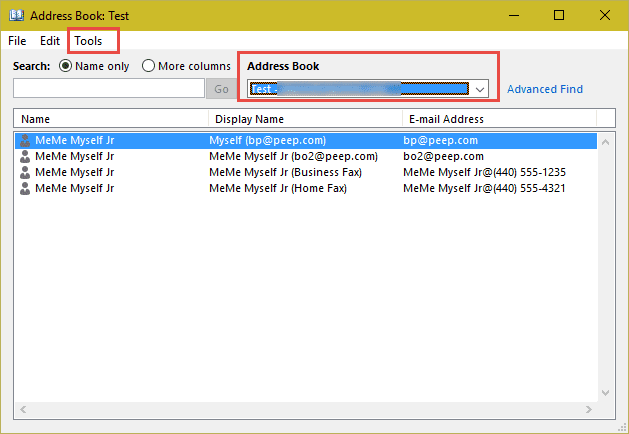
Open the Address book dialog (Ctrl+Shift+B) then open it's Tools, Options dialog.
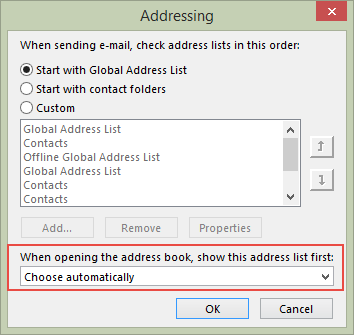
In Outlook 2010 and newer, select the address list to display first from the dropdown at the bottom of the dialog.
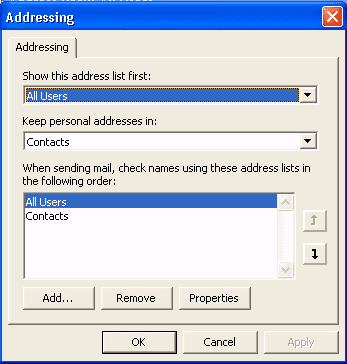
In Outlook 2007 and older, the option to set which address book is shown first when you click To is at the top. You can also select a contacts folder where your personal addresses are kept, and set the order auto-resolution searches your address books.
Video Tutorial
Control the Order of Address Books in the Show Names From List
Note: The following does not apply to modern versions of Outlook.
We're concerned in this case with the order in which address books are listed in the Address Book, under the Show Names from list, and which Contacts list is displayed first. If you are using Microsoft Exchange Server, you may see the Global Address List by default.
We're concerned in this case with the order in which address books are listed in the Address Book, under the Show Names from list. If you are using Microsoft Exchange Server, you may see the Global Address List, then Recipients lists taking up lots of room at the top, with the Contacts list(s) and Personal Address Book (if installed) at the very bottom.
The order of this list has no relation whatsoever to the order in which address lists are checked when recipient addresses are resolved. Instead, it is controlled strictly by the order in which services that include address books are installed in the profile. (Because this is a profile issue, it does not affect Outlook 98 or Outlook 2000 running in Internet Mail Only mode.)
For example, let's say you want address lists to appear in this order:
- Outlook Address Book and Contacts folder(s)
- Personal Address Book
- Exchange Server GAL and Recipients
One method would be to create a new profile, using the Manually configure services option to install services in this order -- Outlook Address Book, Personal Address Book, Microsoft Exchange Server.
The other method would be to remove the PAB and Exchange Server services from an existing profile, then add the PAB and Exchange Server services back into the profile, in that order.

Mike Shick says
How about when choosing people, and having a default address book selected instead of defaulting to Contacts
Diane Poremsky says
In the Address book's Tools > options, if you have Automatic selected for "When opening the address book, show this address list first:", it will default to the account's gal when you use exchange accounts. You need to select a specific folder if you want a contacts folder.
Mike Shick says
Thanks, Dianne. This is what I meant.
https://app.box.com/s/wb6dvp40yhekpftkdjqa4eiswcponqwm
Diane Poremsky says
Ah, you want to select a specific contacts folder to display when you open the People module. The last folder selected should stay selected, but you can't set a default contacts folder - it's the default Contacts folder in the default data file. you can use a macro to always select a specific folder.
Mitch Zoren says
Outlook 2016, re Address Book groups:
1. Is there a view where only groups can be shown rather than searching for them through the address book?
2. Can group member email addresses be configured so that they change if the individual contact member's address is changed? Otherwise you may have to make the change in 3-4 places depending on how many groups the contact is in.
Thanks,
Mitch
Diane Poremsky says
1. No. Recommendation is to either use leading # so they float to the top (or lead with Z so they are at the bottom) or use the same word in each - such as Grp so you can search for it.
2. In Contact Groups within Outlook Contacts, no, they won't auto update. There is an update button within the Group form, but you need to open each group then update. It's one of the reason we recommend using categories to group contacts. The only issue is that you need to select the contacts then use new message to - you can't use the To button to select them.
Mitch Zoren says
I just got Outlook 2016 (2016 office 365). I imported an csv file with first, last, and email addresses. The address book options are set for 'start w/ contact folders' and opening address book 'show contacts first'. Too much confusion online between old and new Outlook. How do I type either first or last name in 'To' and find all that apply (without pressing Cntl K)?
Thanks,
Diane Poremsky says
You have 3 options... one is Alt+K (Ctrl+K if still in the address fields).
Another is to right click on the red underline to select one of the names from the list.
Third way is to click the To button then select More Columns, type in the first few letters and click Go. (Name only matches the first letters in the name column).
The first two are generally faster - once you build up an autocomplete list, the names will popup as you type - use the arrows or mouse to select the right person.
Mitch Zoren says
Hi Diane, The Crtl K works, didn't know about the Alt K. The red underline doesn't show up unless I start entering something in the body of the message. Is there a faster way to get it? I tried the 'More Columns' method and it's not that bad. I imported my entire contacts list in text format so my autocomplete list should be done?? This process was much simpler using WLM.
Thanks, Mitch
Diane Poremsky says
>> The red underline doesn't show up unless I start entering something in the body of the message. Is there a faster way to get it?
I'm not aware of a way to trigger it - it "just works" here - fairly fast too. Well, it used to be fairly fast - tonight it's super slow. :)
Diane Poremsky says
BTW -
>> I imported my entire contacts list in text format so my autocomplete list should be done??
Did you use nk2edit to import the list into autocomplete? The autocomplete list isn't automatically*** created from contacts - it's created when you send mail. ***If you use outlook.com or office 365 exchange online, the server will troll the mailbox and add names to the autocomplete list.
Addresses should resolve when you click ctrl+k/alt+k - if they don't then they weren't resolved in the contact when they were imported. if you see them in the address book when you click to, the addresses should be resolved.
hben says
Is it possible to modify the default address book only when I send the mail from my own mailbox and not from the shared boxes mounted in my profile? Also is it possible to script (automate) the displaying of the default address book especially when the change concerns several users?
Christine Wong says
Why I cannot change the order of address book displayed in Show Name From List even though I had changed the order in "Addressing" dialogue. Many Thanks! Christine
Diane Poremsky says
The order in the Addressing dialog (Address Book's Tools, Options dialog) controls the order outlook search for matched when resolving, it doesn't have the order in the dropdown lists.
libby says
I want to change the order of the phone numbers. right now the business number is first. I want the mobile number to be first. how do I do that?
Diane Poremsky says
Where are you looking? If in the contact, you'll need to change it one contact at a time - open the contact, click on the phone button and select mobile. Click on the second one and select a different # - the ones with checks have numbers. short tutorial
The order can be changed in views, but customizing views. The order on screen is usually the order used in printouts.
Peter Barwell says
All my addresses ar on iCloud. Every time I need to search addresses it takes ne to CONTACTS How can I get rid of Contact so that I only have iCloud?
Diane Poremsky says
You can't remove contacts but you can set icloud to be the first one shown and the first one in the search order. In the "When sending mail, check addreses... " section, icloud should be on top. "When opening the address book... " should have icloud selected. See Show iCloud Contacts First in the Address Book for screenshots of the dialog in Outlook 2010/2013.
Margaret Hollands says
I'd like to display my contacts in 3 columns across the page. They are currently two columns (or two business card contacts across the page) and I like to see them three across the page at once to enable me to search more quickly. I have clicked on file/page set up/card style/columns and changed columns to three across but the display remains the same.
thanks for your help with this,
Margaret
Diane Poremsky says
In the lower right status bar is a zoom slider - move it to change how many cards you see in the view.
It sounds like the File, page setup stuff was for the print layout, not on screen.