Scanpst was not removed from Outlook Click-to-run versions, its still under the Office installation folders.
When the click to run version is installed, scanpst is under the root directory in the install path.
Outlook 2016:
C:\Program Files\Microsoft Office 16\root\office16\scanpst.exe
Outlook 2013:
C:\Program Files\Microsoft Office 15\root\office15\scanpst.exe
In the traditional installation using an MSI, scanpst is in the usual location under the Office folder:
C:\Program Files\Microsoft Office\Office15\scanpst.exe
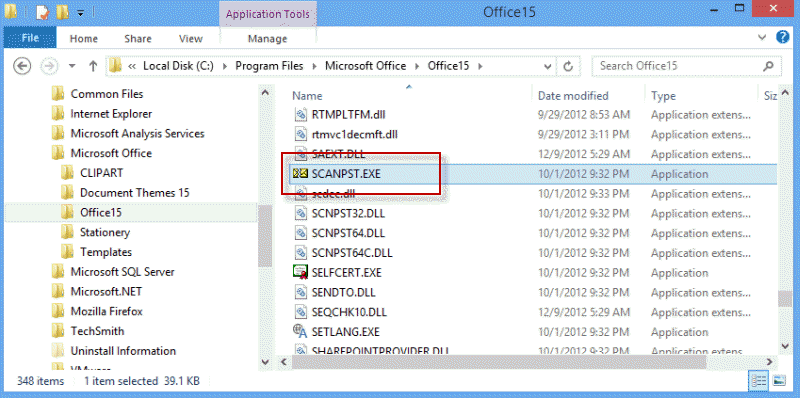
Searching for scanpst on the Start menu search may or may not work.
Outlook 2010 Click to run, scanpst is under the installation directory on the Q drive.

Office 365 2016 path
C:\Program Files\Microsoft Office\root\Office16
This is on an upgraded Windows 10 Home computer. It has Office 2013 click to run. If I doubleclick on scanpst.exe nothing happens. If I right click on it and "Run as administrator" a UAC window will open and when I click on the "Yes" button in the UAC prompt everything simply disappears. I never see the application open.
Did you repairing the office install?
For Windows 8.1 I found scanpst at C:\Program Files\Microsoft Office 15\root \office15
Thanks, Dianne. It appears that, for decades, Microsoft has continued to spit out new versions with location changes which are opaque to the end user. Neither Windows Explorer nor my Start/Search could not find scanpst.exe, until after I found it in the "...root..." path. Then, windows could find it. BTW, this problem goes back to maybe Outlook 2003.
Thanks. Good help.
Scanpst didn't move until the introduction of click-to-run installs, but prior to 2003, a shortcut to scanpst was added to the start menu. They removed the shortcut from Outlook 2003 and made people go look for it.