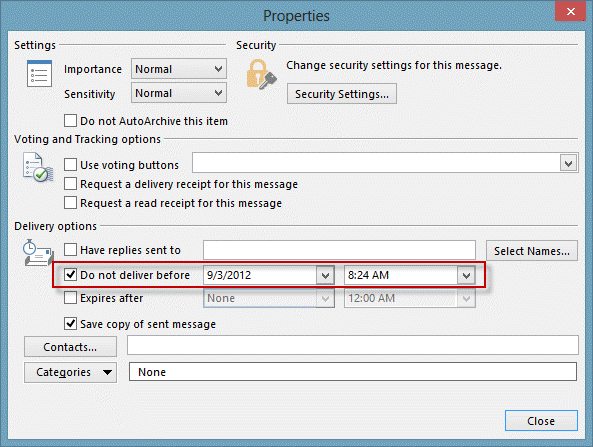
While you can't change the default time for 'do not deliver before', you can use VBA to set the delivery time and save a few steps.
If you prefer to use a utility to delay delivery, utilities at listed at Tools to delay sending a message in Outlook.
In the code example at Create a deferred Birthday message for an Outlook Contact I use the contact's birthday as the new deferred to date.
In the code samples on this page, the date is calculated to be today at 8:24 AM. By changing the decimal, you can send it at other times: .25 = 6 AM, .50 = noon, .75 = 6 PM.
You can also use a specific time by entering it in this format:
SendAt = DateSerial(Year(Now), Month(Now), Day(Now)) + #8:00:00 AM#
The first two samples on this page allow you to defer only the messages you choose, by opening a new message form using the macro that sets the deferment, with the first sample opening a new message form with the deferred time. The second sample is for users who pick from the contacts folders - select a contact then run the macro to open a new message addressed to the contact.
To "defer all messages you send by up to 120 minutes", you can use a rule. If you want to delay all messages sent between specific times (such as outside of normal working hours), you can use an ItemSend macro. See "Delay Delivery of Messages Sent at Specific Times" for a sample macro.
To enter a time each time you create a message using the macro, replace the SendAt = line with the following line. This will open a dialog for you to type the delivery time. Cancelling the dialog will open a message form without deferring delivery.
SendAt = InputBox("Enter a time or click Cancel if you don't want to defer this message. ", "Send this message at", Now())Add the macro to Outlook's VB Editor then customize the ribbon or toolbar, assigning the macro to a button. When you want to send a deferred message, use the 'Deferred' button you created.
Defer message macro
Public Sub SendDeferredMessage()
Dim objMsg As MailItem
Dim SendAt

Set objMsg = Application.CreateItem(olMailItem)

'send at 8:24 AM. .25 = 6 AM, .50 = noon
SendAt = DateSerial(Year(Now), Month(Now), Day(Now)) + 0.35

  objMsg.DeferredDeliveryTime = SendAt

  'displays the message form
  objMsg.Display

  Set objMsg = Nothing

End Sub
Address message to selected contact and defer
Public Sub SendDeferredMessagetoContact()

Dim SendAt
If TypeName(ActiveExplorer.Selection.Item(1)) = "ContactItem" Then
 Set oContact = ActiveExplorer.Selection.Item(1)

'send at 8:24 AM. .25 = 6 AM, .50 = noon
SendAt = DateSerial(Year(Now), Month(Now), Day(Now)) + 0.35


Dim objMsg As MailItem
Set objMsg = Application.CreateItem(olMailItem)

  objMsg.To = oContact.Email1Address
  objMsg.DeferredDeliveryTime = SendAt

  'displays the message form
  objMsg.Display

  Set objMsg = Nothing

Else
MsgBox "Sorry, you need to select a contact"
End If

End Sub
Use a utility
If you prefer not to use a macro, there are a number of utilities available that you can use for delaying or scheduling messages.
They are listed at To delay sending a message in Outlook

Trevor Anderson says
THEN WHAT!!!! SO frustrating. The VBA runs but then nothing happens. You press send and it just sends right away. Not complete!
Diane Poremsky says
What are you using for SendAt = DateSerial(Year(Now), Month(Now), Day(Now)) + 0.35 ? This 8:24 AM.
Victor says
In fact you can change the default time for 'do not deliver before' using an add-in named
SetDeliveryTime
Fred says
I use a macro in Excel to send messages using CDO to several e-mailaddresses.(Microsoft CDO for Windows 2000 Library). Is there a way to send delayed messages using CDO. (for ex. Sunday 04:00 AM)
Diane Poremsky says
oh gosh, its been forever since I used CDO. :(
I see these in message properties when i set a delay (time is set in UTC) - i don't recall if cdo supports delay or how to refer to it and hoped this would give me a clue (such as a potential mail header field name)
Tag: 0x000F0040
Type: PT_SYSTIME
Property Name: PR_DEFERRED_DELIVERY_TIME
Other Names: PidTagDeferredDeliveryTime, ptagDeferredDeliveryTime
DASL: http://schemas.microsoft.com/mapi/proptag/0x000F0040
Tag: 0x3FEF0040
Type: PT_SYSTIME
Property Name: PR_DEFERRED_SEND_TIME
Other Names: PidTagDeferredSendTime, ptagDeferredSendTime
DASL: http://schemas.microsoft.com/mapi/proptag/0x3FEF0040
Andrew Marsh says
Thanks, I will give that a try.
Andrew Marsh says
Is there a way to have a VB script which will allow you to set a "Do Not Deliver Before" to all emails which are in the outbox similar to the defer message macro above. I can send up to 300 emails to our staff through mail merger (using word) and at this stage setting the date to send manually takes forever. I found a nifty VB script to attach documents this way and hoping to find a similar solution for delaying the send. Are you able to assist or point me in the right direction? Thanks in advance
Diane Poremsky says
The item send macro here should be able to add a defer date - https://www.slipstick.com/developer/code-samples/mark-mail-merge-messages-as-urgent/
Try this in the itemsend macro on this page - it will delay the message about 5 minutes from the sending time. If you need to send at a specific time, use the format in the original code.
With Item
SendAt = Now + 0.0035
.DeferredDeliveryTime = SendAt
End With