When you create a rule in Outlook, you can look for messages sent To or CC'd to an address but you can't look only at the CC field. If you want to create a rule to act on mail only by an address in the CC field, you need to use VBA.
The scripts on this page moves messages CC'd to an Exchange DL to a subfolder of the Inbox. Run a script rules (well, any rules) are fine for light-duty work, but when they need to process a lot of mail at once, some messages may be skipped. In those cases, using an ItemAdd event may be better, but even so, under really heavy loads, some messages may still be skipped.
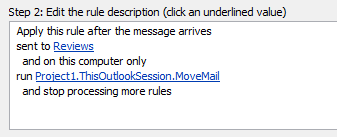 The first sample uses in a Run a Script rule. To use it, create a rule with the condition "Sent to people or group", entering the address you want to filter on. This rule will apply only to mail where the address in the To or CC field. The script will check the CC field for an address or alias and if found, do something. In this example, the message is moved to a subfolder of the Inbox.
The second sample does not use Rules Wizard, instead it runs when Outlook starts and moves mail meeting the condition. It checks every message to see if the CC matches the name you entered.
These rules can be edited to move messages based on other conditions.
Use a Run a Script rule
To use, create a rule with the run a script action, choosing this script.
Sub MoveMail(Item As Outlook.MailItem)
    Dim strID As String
    Dim objMail As Outlook.MailItem

    strID = Item.EntryID
    Set objMail = Application.Session.GetItemFromID(strID)

   If objMail.CC = "dl or alias name" Then
      objMail.Move Session.GetDefaultFolder(olFolderInbox).Folders("subfolder-name")
   End If

Set objMail = Nothing

End Sub
Move the messages using an ItemAdd Event
To use this script, place it at the top of ThisOutlookSession and click in the Application_Startup macro then press Run to enable it without restarting Outlook.
Option Explicit

Private WithEvents olInboxItems As Items

Private Sub Application_Startup()
  Dim objNS As NameSpace
  Set objNS = Application.Session
  ' instantiate objects declared WithEvents
  Set olInboxItems = objNS.GetDefaultFolder(olFolderInbox).Items
  Set objNS = Nothing
End Sub

Private Sub olInboxItems_ItemAdd(ByVal Item As Object)
  On Error Resume Next
  Dim strID As String
    Dim objMail As Outlook.MailItem

    strID = Item.EntryID
    Set objMail = Application.Session.GetItemFromID(strID)

   If objMail.CC = "alias" Then
      objMail.Move Session.GetDefaultFolder(olFolderInbox).Folders("folder-name")
   End If

Set objMail = Nothing

End Sub
More Information
More Run a Script Samples:
- Autoaccept a Meeting Request using Rules
- Automatically Add a Category to Accepted Meetings
- Blocking Mail From New Top-Level Domains
- Convert RTF Messages to Plain Text Format
- Create a rule to delete mail after a number of days
- Create a Task from an Email using a Rule
- Create an Outlook Appointment from a Message
- Create Appointment From Email Automatically
- Delegates, Meeting Requests, and Rules
- Delete attachments from messages
- Forward meeting details to another address
- How to Change the Font used for Outlook's RSS Feeds
- How to Process Mail After Business Hours
- Keep Canceled Meetings on Outlook's Calendar
- Macro to Print Outlook email attachments as they arrive
- Move messages CC'd to an address
- Open All Hyperlinks in an Outlook Email Message
- Outlook AutoReplies: One Script, Many Responses
- Outlook's Rules and Alerts: Run a Script
- Process messages received on a day of the week
- Read Outlook Messages using Plain Text
- Receive a Reminder When a Message Doesn't Arrive?
- Run a script rule: Autoreply using a template
- Run a script rule: Reply to a message
- Run a Script Rule: Send a New Message when a Message Arrives
- Run Rules Now using a Macro
- Run-a-Script Rules Missing in Outlook
- Save all incoming messages to the hard drive
- Save and Rename Outlook Email Attachments
- Save Attachments to the Hard Drive
- Save Outlook Email as a PDF
- Sort messages by Sender domain
- Talking Reminders
- To create a rule with wildcards
- Use a Macro to Copy Data in an Email to Excel
- Use a Rule to delete older messages as new ones arrive
- Use a run a script rule to mark messages read
- Use VBA to move messages with attachments

Hi,
Can someone please help me with the step by step guide for this.. I am new to this and non technical person. Please help
Thanks
Hi Diane,
INSTEAD of moving an email CC'd to a DL to a different folder, what VBA command would I need to use in place of objMail.Move to simply mark the email as "Read" but leave it in my Inbox?
Tad
objmail.unread = false
OK found it ;-)
To move to any folder at the root of my email account, I replaced
objMail.Move Session.GetDefaultFolder(olFolderInbox).Folders("subfolder-name")by
of course, replace "FirstName.LASTNAME@domain.com" by the name of your account. Could also be "Mailbox - FirstName LastName" for example
Thanks Diane, this worked like a charm in my Outlook 2013.
I used your suggestion "If InStr(LCase(objMail.CC), "address") Then" instead. One comment maybe, make sure to type the name of the sysgroup in lower case. Also in my case it only worked if I entered the resolved name and not the full email address. So basically if Outlook displays "SysGroup-Name" in the CC field, enter "sysgroup-name" and not "sysgroup-name@domain.com"
Thank you so much for your quick response! I got it moving to the correct folder now but seems to be moving a lot others as well but will try and work that out...
Thank you again!
Steve
In my case the first script is working when the dl or alias name is the only mail in the cc. If there are more addresses in the cc does not works. Tks
Use something like this instead:
If InStr(LCase(objMail.CC), "address") Then