After the third question this week from administrators who migrated to Outlook 2010 or 2013, only to discover their custom forms are not working as expected, I thought I should mention this. In most cases the forms will likely work just fine in Outlook 2010 or 2013, however, if the forms contain scripting and are published to a public or shared folder, scripting will need to be enabled.
One admin writes:
We have a custom contacts form with some vbs code in it supporting a command button and checking for required categories. I am hoping someone can help explain some odd behavior we are seeing. The code in the custom form works fine if you 'Choose form' from the developer tab, populate the contact data, and save. However, once saved, if you open the contact, you can make changes to the data, but none of the code functions anymore. Going to design view of the broken contact and selecting 'Run this form', again, runs everything fine.
These symptoms definitely point to the scripting setting. You can check the setting for All script in shared folders and Allow script in Public folders in File, Options, Trust Center, Email Security.
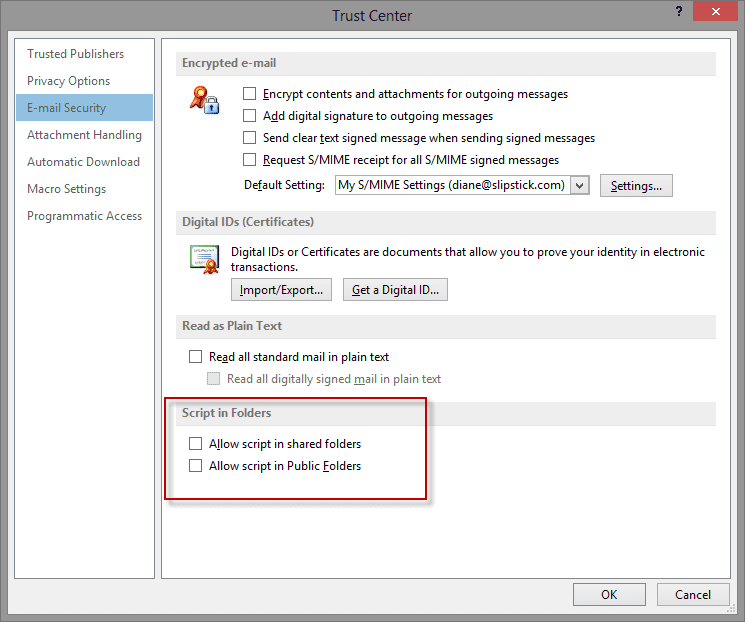
These settings can be controlled using Group Policy. In the Outlook admin template, look under Outlook Options, Advanced.

Pallavi Soman says
we have checked above options, However our custom form which was working fine previously has suddenly stopped working after publishing
we have tried changing all script and security related configurations, all in vain
Diane Poremsky says
It's not you - its outlook. The security update from last week affected it (it was supposed to block scripts in templates, not published forms). I don't have an ETA on a fix - the solution right now to is uninstall the update released June 13.
Which version are you using? https://www.slipstick.com/outlook/updates/outlooks-june-13-2017-security-update/
Pallavi Soman says
outlook version 16
Diane Poremsky says
You need to revert back to an older build and disable updates until its fixed.
https://www.slipstick.com/outlook/2013/uninstall-update-office-2013-click-run/
Larry says
Do you know the security implications of checking these boxes and allowing scripts to run? I am having a lot of trouble finding info on this. Thanks for any leads or info.
Diane Poremsky says
Well, if someone publishes a form containing a script that can trigger an exploit, this will allow the code to run... but someone needs to physically publish it - it can't be published without help from someone with permission to install software and forms. I consider the threat low, but never underestimate the ability of a user to screw things up... so it comes down to do you need custom forms with script behind them? if no, then leave them disabled.
vijay says
hi Diane, we hv a peculiar issue, we recently move to office 2016, and O365, some custom form is not showing up sa form in public folders. just the text which is typed outside of form is visible, otherwise the form reaches the public folder blank. any thoughts.
Diane Poremsky says
The form is not available or it doesn't "work"? Is there code behind the form? Recent security updates affected custom forms with code behind them. See https://www.slipstick.com/outlook/custom-form-security/ for details and the fix.