A user needs to reply to project messages with specific text in the subject and message body as well as CC and BCC it to other members of the project team.
This is easy to do using VBA, then create a macro button on the toolbar or ribbon and use when you need to reply. You'll need to create a copy of the macro for each project.
To use, open the VBA editor using Alt+F11. Right click on Project1 and choose Insert, Module. Copy the macro and paste it into the module, one paste per project. Edit the macros as needed. Rename each macro so they have unique Sub names.
Customize the toolbar or ribbon to add a button for the macro. Place it near the Reply button so it's easy to find and use it when you reply.
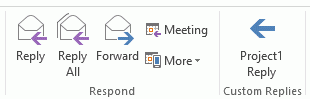
If oMail.Body doesn't handle HTML as expected, use oMail.HTMLBody instead. This will convert all messages to HTML. You could use IF statements to check for the message format and use the correct format when inserting it into the reply.
Public Sub ReplyProject1()
Dim oMail As Outlook.MailItem
Dim Item As Outlook.MailItem

' This is used so we can get the original subject
Set Item = Application.ActiveExplorer.Selection(1)

Set oMail = Application.ActiveExplorer.Selection(1).Reply


With oMail
    .Body = "Regarding: " & oMail.Subject & vbCrLf & _
"In Reply to: " & Item.Subject & vbCrLf & _
"More required text" & vbCrLf & vbCrLf & oMail.Body
    .CC = "alias1@domain.com"
    .BCC = "alias2@domain.com"
    .Subject = "subject text- " & Item.Subject
    .Display
End With
End Sub
More Information
If you need to always reply using a specific account, see Choose the account to send a reply from

Leave a Reply