This code is based off of the macro used to always use the Tasks folder, not the To-Do List, when you switch folders in Outlook.
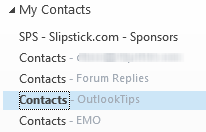 Use to it always open a specific folder when switching to the Contacts (or People) module.
To select a specific folder in the list, change the number in this line to open a different folder. For example, the code below opens the 4th folder in the My Contacts group as seen in the screenshot.
Dim WithEvents objPane As NavigationPane

Private Sub Application_Startup()
    Set objPane = Application.ActiveExplorer.NavigationPane

End Sub


Private Sub objPane_ModuleSwitch(ByVal CurrentModule As NavigationModule)
  Dim objModule As ContactsModule
  Dim objGroup As NavigationGroup
  Dim objNavFolder As NavigationFolder

 If CurrentModule.NavigationModuleType = olModuleContacts Then
     Set objModule = objPane.Modules.GetNavigationModule(olModuleContacts)

' Use the Group name the folder is in
     Set objGroup = objModule.NavigationGroups("My Contacts")

' Replace 4 with the index number of the folder you want to use
     Set objNavFolder = objGroup.NavigationFolders.Item(4)
     objNavFolder.IsSelected = True
  End If
  Set objNavFolder = Nothing
  Set objGroup = Nothing
  Set objModule = Nothing
 End Sub
Opening specific folders in other navigation panes
You can use this method to default to a specific folder in other navigation panes.
| Module | Dim objModule As ? | olModule? |
|---|---|---|
| MailModule | olModuleMail | |
| Calendar | CalendarModule | olModuleCalendar |
| Contacts | ContactsModule | olModuleContacts |
| Tasks | TasksModule | olModuleTasks |
| Notes | NotesModule | olModuleNotes |
| Journal | JournalModule | olModuleJournal |
Replace the group name and index number with the group name the folder is in and it's position within the group.
Note: Mail works with the Favorites list.

I would like to open several Outlook default folders - eg calendar, contacts etc - AND launch each in a new window. Every folder displays its own icon, making it easy to identify with ALT-TAB, if I open it manually, (right click, open in new window). However, every folder displays the same inbox icon, making it difficult to identify with ALT-TAB, if I open it programmatically in vba, using the following code: +++++++ Sub openfolderwindows() On Error Resume Next Dim NS As Outlook.NameSpace Dim Folders As Outlook.Folders Dim F As Outlook.MAPIFolder Dim ExpandDefaultStoreOnly As Boolean 'which folders should be opened? '(false = all +/- conditions; true = personal folders only) ExpandDefaultStoreOnly = True Set NS = Application.GetNamespace("Mapi") If ExpandDefaultStoreOnly = True Then 'open personal folders only Set F = NS.GetDefaultFolder(olFolderInbox) Set F = F.Parent Set Folders = F.Folders loopwindows Folders, True Else 'open all folders loopwindows NS.Folders, True End If DoEvents End Sub Sub loopwindows(Folders As Outlook.Folders, ByVal bRecursive As Boolean) For Each F In Folders Set Application.ActiveExplorer.CurrentFolder = F If F = "Outbox" Or F = "Calendar" Or F = "Contacts" Or F = "Tasks" Then F.Display DoEvents If bRecursive Then If F.Folders.count Then loopwindows F.Folders, bRecursive End If… Read more »
Upgrading to 2013 won't change a thing. :( I just tested it. The code is basically opening in place and that always uses the main outlook icon - same as if you selected a different folder in one outlook window.