An Outlook user had problems assigning tasks to users outside their company Exchange Server:
We use Exchange 2010 and the administrator configured it to not send RTF to Internet addresses. While it solves the problem of attachments getting encoded as winmail.dat files, the unintended consequence is that we can't assign tasks to contractors who don't have local addresses. What can we do?
The Exchange administrator can create a Remote Domain for the contract's email domain and set it to "let Outlook decide" the message format for all messages sent to this domain. Along with controlling the email format, the administrator can also configure Exchange to allow (or block) Out of Office messages and read or delivery receipts or non-delivery report to the domain.
Use PowerShell to log into Office365 Exchange
It's accessed through the Exchange Management Console Organization Configuration > Hub Transport > Remote Domains or using the following cmdlets.
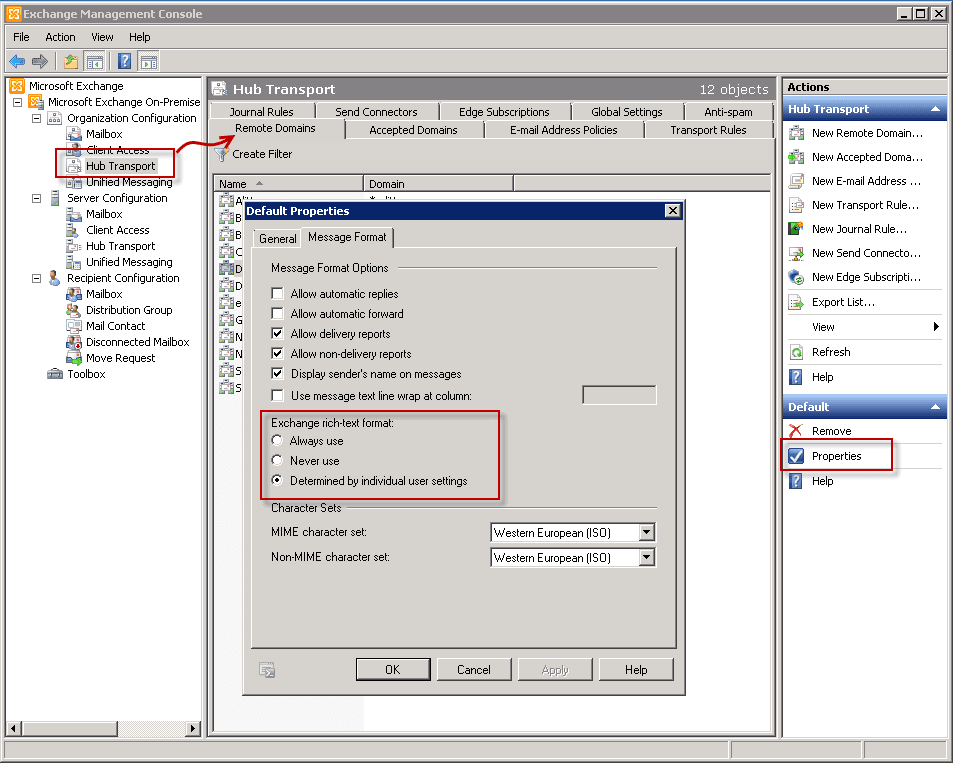
To get a list of all remote domains where TNEF is disabled:
Get-RemoteDomain | Where {$_.TNEFEnabled -eq $false}To create a new remote domain:
New-RemoteDomain -DomainName thedomain.com -Name thedomain
To enable TNEF:
Set-RemoteDomain -Identity thedomain -TNEFEnabled $true
To disable TNEF:
Set-RemoteDomain -Identity thedomain -TNEFEnabled $false
More Information
Set-RemoteDomain (TechNet)
Manage TNEF Message Formatting with Remote Domains

For those who use Exchange Online (Office 365 mailbox) the domain exclude can also be done in the web frontend (Exchange Admin Center). "Mail flow" > "remote domains", add a new one, name it, enter the ending of the mail address (that after the @), f.e. "mygreatdomain.net", choose "Use rich-text format">"never" in the option in the bottom.
Now all mails going to this domain should be sent in a more simple form.
Thanks, I had problems with the winmail.dat , specifically with the re-send of some mail to gmail account, I chose: Always use Exchange RichText Format, and now is working!
Great, thank you, this was very helpful. :)